PUBG MOBILE Introduction
Recharge PUBGM UC via FLASHMUNK to purchase permanent outfits, vehicles and weapon skins.
Supported Device
Mobile Phone
Supported Server
PUBG Mobile Global Server
Notice:
Servers of South Korea, Japan, Vietnam and Taiwan are not supported.
Required Information for Recharge
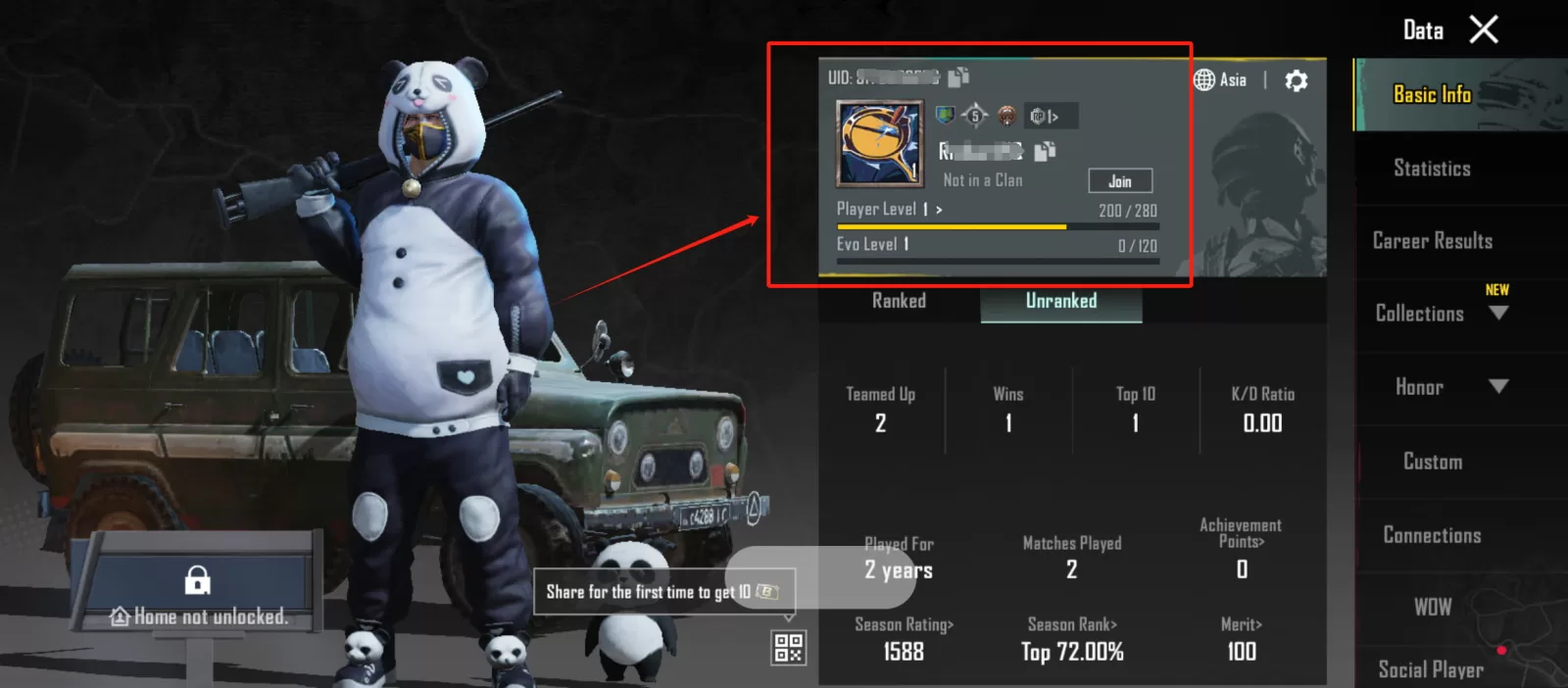
PUBG Mobile UID
Notice:Please fill in all required information accurately to avoid delays in your PUBG UC recharge.
Recharge Result
After your PUBGM UC purchase via FLASHMUNK is completed, you can check your UC balance in the in-game mailbox.
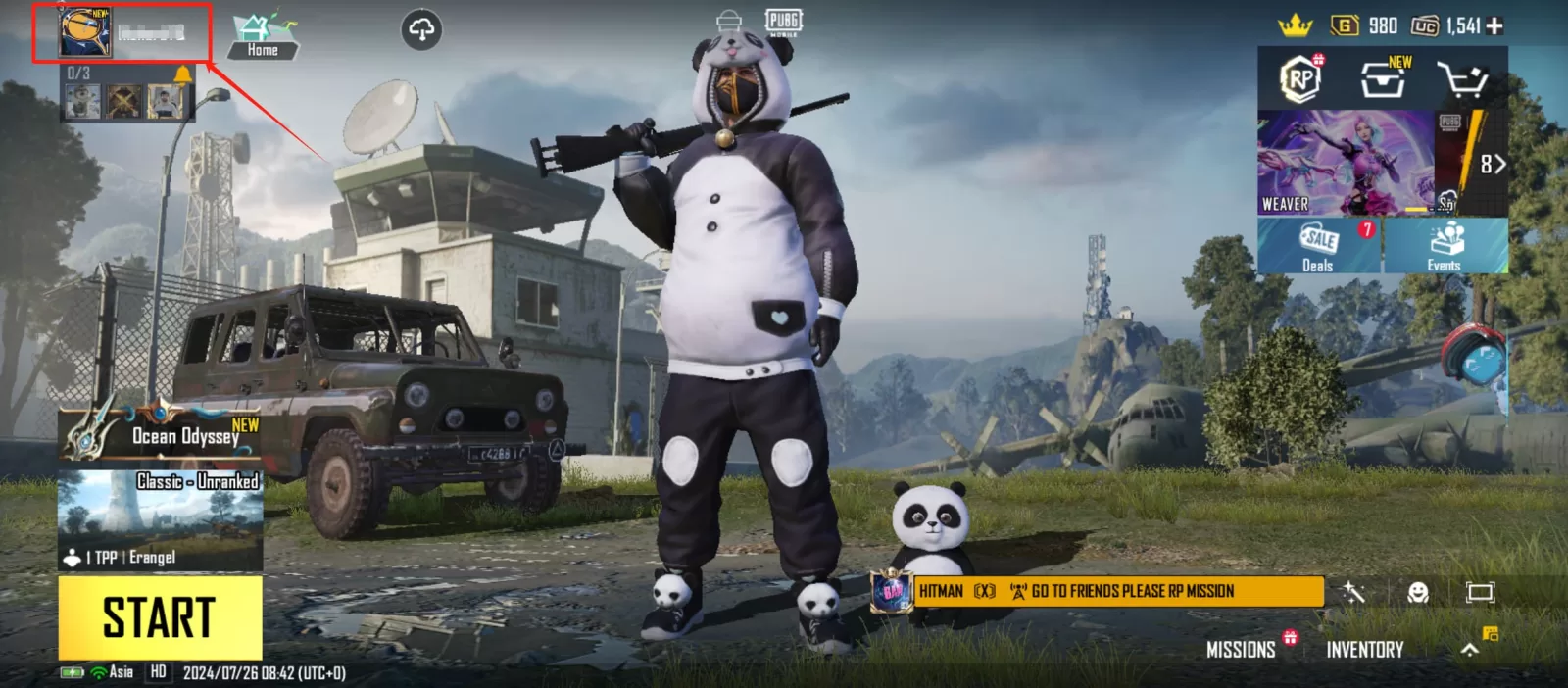
How to Find Your PUBG Mobile UID?
About PUBG Mobile
PUBG Mobile is an epic battle game optimized for mobile devices, delivering intense multiplayer combat and thrilling survival gameplay. Enjoy fast-paced 10-minute matches, diverse maps and various game modes to experience strategic warfare anytime and anywhere. With customizable controls, realistic firearms and high-fidelity in-game items, it brings the ultimate mobile gaming experience. PUBG MOBILE caters to both casual and competitive gameplay, perfect for teaming up with friends or solo progression.
What is PUBG Mobile UC?
UC (Unknown Cash) is the premium in-game currency of PUBG Mobile. It can be used to purchase character skins, weapon skins, costumes, emotes and other cosmetic items to customize your in-game character and gear. Additionally, UC can be spent on crate keys for premium loot boxes, as well as Elite Royale Pass, which grants exclusive quests, challenges and unique rewards unavailable to free players. UC is essential for players who want to enhance their gaming experience and stand out on the battlefield.
What Can You Buy with PUBG UC?
PUBG UC can be redeemed for a wide range of in-game content and features, including battle passes with seasonal rewards, exclusive character & weapon skins, and vehicle skins to customize your rides. Players can also purchase emotes for in-game interactions, random reward crates, and voice packs to change in-game voice commands. Moreover, exclusive discounted bundles are available for UC purchase, containing multiple items to personalize your gameplay and unlock limited content.
How to Obtain UC in PUBG Mobile?
There are multiple ways to get PUBG Mobile UC. The most direct method is to buy UC directly through the official PUBG Mobile app with real currency, with various bundle options to fit different budgets and needs. Limited-time official events also offer free UC as occasional rewards.
Trusted third-party platforms such as FLASHMUNK provide a safe and convenient way to buy PUBG Mobile UC. These platforms often offer exclusive discounts and flexible payment methods, allowing players to top up UC quickly and upgrade their gaming experience.
Why Buy PUBG Mobile UC on FLASHMUNK?
When purchasing PUBG Mobile UC, players look for budget-friendly prices and secure account protection. Here is why FLASHMUNK is your best choice:
- Competitive Pricing
FLASHMUNK offers industry-leading low prices and cost-effective UC bundles, letting you get more UC with less cost. It is the ideal option for budget-conscious players who want premium in-game content. - Guaranteed Security
User safety is our top priority. We support secure payment methods including PayPal and credit cards to protect your financial data. All suppliers undergo strict verification to ensure legitimate and reliable transactions. - 24/7 Customer Support
Our round-the-clock support team assists with all order issues. You can contact us via email or live chat for instant help, ensuring a smooth and hassle-free recharge experience.
FLASHMUNK is highly recommended for anyone looking for cheap and safe PUBG UC. With competitive rates, secure transactions and reliable customer service, it is the top choice for all PUBG Mobile players.
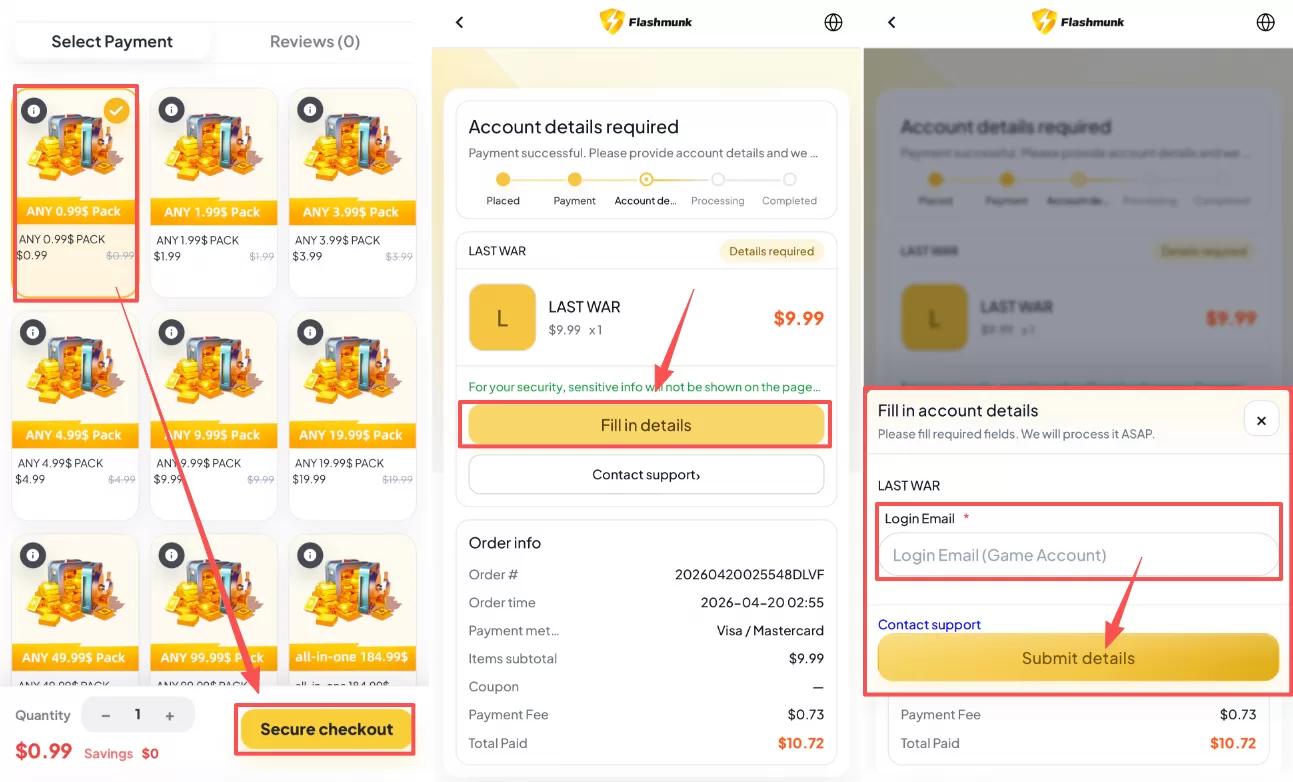
How to Recharge PUBG Mobile on Flashmunk.com
Follow the steps below to complete your PUBG Mobile recharge on Flashmunk.com:
- Select your desired bundle and click the Secure Checkout
- Choose your preferred payment method.
- After completing payment, click Fill in Detailsand submit the required information, so our team can finish your recharge order.